Google blocked, The Hosting Provider connection
Do you or your clients get URL or DNS timeouts or URL\Network unreachable errors by search engines or online tools
when they try to access or connect to your (clients) web site?
At the same time you find users via a browser or others tools can access the web site unblocked with no problems?

Then your hosting services or provider may have blocked Google, Yahoo Slurp or crawling type utilities via their
firewall, network management services or by the hosting servers themselves.

In this article we present troubleshooting techniques that can be used to help identify the bots themselves and
determine if and where the bot is blocked at the network level so a proper resolution can be effected. We also
touch upon some of the more popular server based firewall and security utilities.
Why would my host firewall block Google? For that matter, why would my host block any search engines or tools?
To answer that question we need to understand a little about the internal network of our hosting provider and bots.

Networks not only route data to their proper destination but they play an integral part in security. Typical security
concerns are excessive bandwidth usage, hacking or denial of service attacks. One method that may be implemented
manually by network personnel or automatically by adaptive security in firewalls is to identify statistically high
access rates by a particular IP address or User-agent and then accordingly configure a network blocking rule.

Search engines frequently crawl websites with bots to get the latest updates to your pages and diagnostic or website
management tools can submit many requests in succession, therefore they can be misidentified as a type of malicious
access. Often times the Google block might be put up without the hosting provider or network technicians awareness!

Googlebot often falls prey to such automated tactics and gets blocked as they have numerous servers that can access
many websites quickly to gather the latest updates. This crawling performance is in fact desired and preferred for
quickly changing sites that use syndicated content such as news feeds, headline sites like digg or some blogs but
this speedy crawling can throw up a red flag on firewalls. Additionally in some cases poorly implemented CMS sites
like blogs and forums help exacerbate this process when they provide multiple paths and URLs to the same content.
In these situations unfortunately this may result in the provider blocking Googlebot or other Google user agents.

As one of the most often misunderstood crawlers is Googlebot, we will refer to that User-agent as an example but
understand blocking can occur for any user-agent or IP and these procedures are valid with any SE bot or any
requestor that has an identifiable User-agent or IP address.
When trying to determine if a bot is being blocked, the easiest way is to check this is via it's IP Address. If this
address is constant or is known to be in a certain range then the task is relatively easy. Network Engineers at the
hosting provider can then use these addresses and check their firewalls and if necessary add specific rules to
allow these bots access.

In some cases and almost always the case with Googlebot in particular, obtaining an all inclusive list of the exact
IP addresses being used or even their ranges is not a practical option. In this case a network analyizer can be used
at the hosting providers datacenter to find the bot by using the User-agent string provided in the HTTP get request
as an inclusive filter to capture the required IP Address data.

The best place to obtain or sniff this data is the point on the hosting providers network that is "outside" of the
firewall closest to their connection to the internet. In Figure 1 this is identified as Network analyzer 1
connected to segment F of the network. This point is also known as the DMZ or Demilitarized Zone.

Some common User-agent strings:
- Mozilla/5.0 (compatible; Googlebot/2.1; +http://www.google.com/bot.html)
- Google-Sitemaps/1.0
- Mozilla/5.0 (compatible; Yahoo! Slurp; http://help.yahoo.com/help/us/ysearch/slurp)
To help insure these are in fact valid User-agents you can perform a reverse DNS lookup of the IP Address of the bot.
For this purpose you can use command line tools such as dig and nslookup or any number of online utilities
such as Dig lookup- kloth.net.

Another way to identify Googlebot or the domain the IP address belongs to is to have the network analyzer configured
to automatically perform network resolution. On the popular Wireshark analizer you can find this on the capture
options screen. There is a checkbox in the name resolution section for Enable network name resolution. Once this
is set then you can just filter on the domain name such as google.com or a just a portion (google). Then the IP
address can be found in the packet details display in the src or source address field.
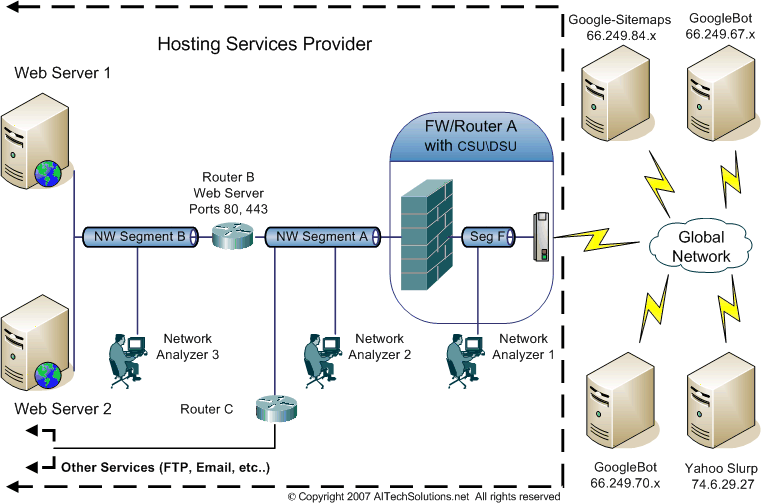 Figure 1 - Simplified datacenter example
Once the IP addresses are identified and access given passage through the firewall, the situation is normally
resolved. If it is not then the network analyzer can be used to track googlebot through the internal network.

A good place to check would be just on the inside of the firewall shown in fig.1 as Network Analyzer 2 which
is connected to network segment A. If Googlebot can't be found here then there is still an issue at the firewall.
If Googlebot is reaching this point and the issue is still not resolved then we need to move further down the line
to find the block.

At this point it might be best to place the Network Analyzer on the same network segment as the Hosting Server.
In our datacenter example this is depicted by Network Analyzer 3 connected to network segment B.

Given that the previous test on "Network Segment A" was successful, but now the bot can not found on segment B
then Google is blocked between this network segment and the firewall. In our example illustration Fig. 1 this would
include Router B. Keep in mind that in a typical datacenter there very well may be other systems and hardware
involved such as load balancers, proxy servers, more firewalls, switches and/or routers, etc.. in addition to or in
place of our pictured router B. At this point the Google block needs to be resolved from the network point of view.


On the other hand, if Googlebot is detected on this network segment where the Hosting Server is connected then at
this point the network is probably not responsible for blocking Google but likely something on the Hosting Server itself.

Attn Network Engineers: In addition to just detecting that Googlebot is present on the network segment, it is also
most useful to insure the Googlebot packets captured have the correct destination IP address of the Hosting Server
(or virtual host) and the HTTP header contains the correct domain URL that is having the issue. With that infomation
on hand then the SysAdmin will be better prepared for their task to check the servers configuration and determine
the cause of any Google block or trap that may exist on the hosting web server.
Now that we have determined that the HTTP request from Google (or other User-agent) is reaching the
network interface of the server or server farm, any blocking done at this point would likely be on the
hosting server or the website configuration itself.

Servers can and usually have their own software based firewall to provide further protection against such
threats as denial of service attacks, hacking, email spam, etc. It often happens that blocking occurs due
to automated actions taken by such utilities possibly without notice to\by server administration personnel.

In Linux based servers one popular utility for CPanel front-ended servers is ConfigServer Security Firewall which
typically comes with LFD for login brute force protection,- CSF/LFD. Another firewall utility is  Advanced Policy Firewall
with Brute Force Detection- APF/BFD. Basically these utilities control access by manipulating IP Tables by applying
allow\deny rules. They also have many other integrated security related functions. Check the web sites for more information.

Apache servers may also use the add in module mod_security which is a web application firewall. Typically this module
issues 403,405,406, 413 and other HTTP responses upon a HTTP request signature match and other more complex
checks and algorithms. Check the web site for more information.

On Apache based servers there are also per site\directory checks and blocks that can be added to the server configuration
(httpd.conf), virtual hosts configuration (vhosts.conf) or on a per directory, user configurable file typically called .htaccess.
More information available on the Apache HTTP web server site.

Check that firewall software applications and configuration files such as these are not blocking Googlebot or other desired requestors.
Back to the top
If you found this page useful, consider linking to it.
Just copy (mark then ctrl-c) and past into your website.
This is how this link will look: Host blocking Google
- If you found this article on host provider SE, web management or Google blocking useful (or not) and
have comments, criticisms, or suggestions please feel free to drop us a note using our Contact form
Thanks! Enjoy! I hope this is helpful!
Version 1.0 Copyright © 2007-2014 www.AITechSolutions.net. All rights reserved.
 AITech Solutions Home Site Map Services Contact Us Networking Topics